timbers-chrome-ext
PDX Matchday


A Chrome-first matchday extension for Portland Timbers and Portland Thorns supporters, with live countdowns, viewing details, standings, kickoff and goal alerts, and an integrity-controlled fan confidence poll.
Project Status
- Extension version:
1.0.5(Manifest V3) - Public site: tony5897.github.io/timbers-chrome-ext
- Privacy policy: PRIVACY.md (also hosted on the public site)
- Chrome Web Store: published and public; release
1.0.5is live — view or install it here - Backend: dual-team API (schedule, standings grouped by conference, live match) is deployed to staging and production (last deployed 2026-09-24); ESPN remains the server-side sports-data provider
Features
- Live countdown to the next Timbers or Thorns match
- Match date/time, venue, and TV/streaming details
- Live score and match events (goals, kickoff/halftime) while a match is in progress
- League standings, grouped by conference for leagues that have one (MLS) and as a single table for leagues that don’t (NWSL)
- Fan confidence poll with community vote breakdown
- Self-service deletion for retained community responses and anonymous identity
- One-click access to the official club schedule (MLS for Timbers, NWSL for Thorns)
- Hourly background refresh via service worker
- Team-aware home and away themes for both clubs
- Optional kickoff and goal notifications
Browser Support
| Browser | Minimum Version | Status |
|---|---|---|
| Chrome | Current stable | Primary review target; older versions not verified |
| Edge | Current stable | Chromium candidate; separate browser verification required |
| Safari | Current macOS/Xcode | Conversion tooling provided; compatibility not verified |
Installation
Reviewer path and branch identity
Recorded checks and limitations
Use main explicitly: GitHub’s default develop branch has a different layout and development history. At the September 30 review, main was 7cb124a and develop was 2287dce; they had diverged. This README describes the main layout (extension/). Commit identity, source version, and the installed store package are separate evidence; inspect the store’s displayed version before comparing them. No branch reconciliation is required for local review.
Start with fallback resolution, failure-mode tests, and popup behavior tests. The popup suite loads the actual script through Jest so exercised behavior contributes to coverage. Coverage includes the four extension logic files; API and emulator suites are separate.
No .env file or production credentials are required for install, lint, type-check, unit tests, builds, or the demo-project emulator suites. Use Node 22 and npm 10/11; test:rules additionally needs Java 21+. Run npm run verify:phase0 for the complete local pipeline. First emulator execution downloads a Java archive.
The packaged public runtime config points at the deployed backend. Browsing schedules makes read requests; community features can create anonymous authentication sessions and submit records. For isolated review, use test fixtures and the emulator, and do not vote or delete community data. npm run dev is a popup preview, not a complete replacement for loading the extension. Backend deployment requires separately configured Firebase projects and operator credentials; deployment/export/smoke commands are not setup steps.
Prerequisites
- Node.js 22 and npm
- Java 21 or later for Firestore emulator verification
Setup
git clone --branch main https://github.com/Tony5897/timbers-chrome-ext.git
cd timbers-chrome-ext
npm ci
npm run build:icons
Chrome / Edge
- Navigate to
chrome://extensions(oredge://extensions) - Enable Developer mode
- Click Load unpacked and select the
extension/folder
Safari (macOS)
Safari requires converting the extension into an Xcode project using Apple’s tooling.
Requirements: macOS with full Xcode installed (not just Command Line Tools).
-
Set Xcode as the active developer directory (one-time):
sudo xcode-select -s /Applications/Xcode.app -
Run the conversion script:
npm run build:safariThis creates a
safari/directory containing the Xcode project. -
Open the generated Xcode project:
open safari/PDX\ Matchday/PDX\ Matchday.xcodeproj -
In Xcode, select a signing team under Signing & Capabilities, then build and run (Cmd+R).
-
Enable the extension in Safari:
- Safari > Settings > Extensions > enable PDX Matchday
For unsigned development builds:
- Safari > Settings > Advanced > check Show Develop menu in menu bar
- Develop > Allow Unsigned Extensions (requires re-enabling after each Safari restart)
Safari verification boundary
Conversion alone does not establish Safari support. Verify these APIs, permissions, authentication, notifications, and service-worker behavior on the intended macOS/Safari version:
chrome.runtime(sendMessage, onMessage)chrome.storage.localchrome.alarms- MV3 service workers
No minimum Safari version is claimed by the current verification record.
Usage
Click the PDX Matchday icon in the browser toolbar to open the popup. Choose Portland Timbers or Portland Thorns; the extension reads the latest schedule, standings, and live state from the Matchday API and displays the next upcoming match with a live countdown timer.
Use the Confidence Poll section to vote on your confidence level and see how other fans are feeling.
Development
npm Scripts
| Command | Description |
|---|---|
npm test |
Run Jest test suite with coverage |
npm run test:watch |
Run tests in watch mode |
npm run dev |
Serve the popup at http://localhost:4173/popup.html outside the extension shell, for quick UI iteration (supports ?team= and ?scheme= preview params) |
npm run lint |
Run ESLint across the repository |
npm run typecheck |
Build shared packages and type-check every TypeScript workspace |
npm run build |
Build the API and verified extension release artifact |
npm run build:packages |
Build shared contract and domain workspaces |
npm run build:api |
Build shared packages and the Firebase API |
npm run test:api |
Run compatibility API unit tests |
npm run test:rules |
Build the API and run Firestore emulator suites |
npm run export:legacy |
Export legacy vote records for the Firestore migration |
npm run package:extension |
Build the exact Chrome Web Store ZIP |
npm run verify:extension |
Verify ZIP inventory and secret exclusions |
npm run preflight:phase0 |
Validate local release tooling, configuration, and optional backup evidence before a deploy |
npm run smoke:phase0 |
Exercise deployed public and optional authenticated API behavior |
npm run verify:phase0 |
Run the full local verification pipeline: lint, typecheck, tests, and build |
npm run clean |
Remove generated build, coverage, package, and emulator output |
npm run build:icons |
Generate 16/48/128px icons from icon.png |
npm run build:store-assets |
Regenerate Chrome Web Store screenshots and promo images from the live popup |
npm run verify:store-assets |
Verify store asset dimensions and approved content digests |
npm run build:safari |
Convert to Safari Web Extension (requires Xcode) |
Project Structure
timbers-chrome-ext/
├── extension/                 # The installable Chrome/Edge/Safari extension
│   ├── manifest.json          # Extension manifest (MV3)
│   ├── background.js          # Service worker — fetches and caches match data
│   ├── popup.html             # Extension popup UI
│   ├── popup.js               # Popup logic — countdown, voting, data display
│   ├── styles.css             # Popup stylesheet (CSS custom properties design system)
│   ├── runtime-config.js      # Public Firebase and API runtime configuration
│   ├── auth.js                # Firebase anonymous authentication client
│   ├── community.js           # Authenticated compatibility API client
│   ├── icon.png                # Source icon (640×640)
│   ├── icons/                  # Generated extension icons
│   │   ├── icon-16.png
│   │   ├── icon-48.png
│   │   └── icon-128.png
│   └── data/
│       └── fallback.json       # Bundled match fixture (last-resort fallback)
├── scripts/
│   ├── generate-icons.js     # Sharp-based icon generator
│   ├── convert-safari.sh     # Safari Web Extension converter wrapper
│   ├── package-extension.mjs # Exact Chrome ZIP builder
│   ├── phase0-readiness.mjs  # Release environment and evidence preflight
│   ├── smoke-phase0.mjs      # Deployed API smoke-test evidence runner
│   ├── clean-generated.mjs   # Removes rebuildable generated output
│   └── cleanup-safari-resources.py  # Post-conversion Xcode bundle cleaner
├── packages/
│   ├── contracts/            # Shared Zod API and domain contracts
│   └── domain/               # Shared team configuration and stable identifiers
├── services/api/             # Firebase Functions compatibility backend
├── emulator-tests/           # Firestore rules tests
├── tests/
│   ├── scraper.test.js       # Background scraper unit tests
│   ├── popup.test.js         # Popup UI and integration tests
│   ├── auth.test.js          # Firebase anonymous auth client tests
│   ├── community.test.js     # Compatibility API client tests
│   └── mocks/
│       └── styleMock.js      # Jest CSS mock
├── .github/workflows/ci.yml  # GitHub Actions CI pipeline
├── CONTRIBUTING.md           # Contribution guidelines
├── PRIVACY.md                # Privacy policy
└── LICENSE                   # ISC License
Extension Messaging Architecture
Chrome extensions run in isolated execution contexts — the popup UI and the background service worker cannot share memory or call each other’s functions directly. This project uses Chrome’s runtime messaging API to bridge them.
Data flow
┌─────────────┐   sendMessage({ action: 'getMatchData' })   ┌──────────────┐
│  popup.js   │ ──────────────────────────────────────────▶  │ background.js│
│  (popup UI) │                                              │ (service wkr)│
│             │ ◀──────────────────────────────────────────  │              │
└─────────────┘   sendResponse({ matchData })                └──────┬───────┘
                                                                    │
                                                     fetchAndParseSchedule()
                                                                    │
                                                                    ▼
                                              Matchday API (Firebase)
                                                                    │
                                                                    ▼
                                              ESPN provider boundary
- Popup opens —
popup.jsdispatcheschrome.runtime.sendMessage({ action: 'getMatchData' })and shows a skeleton loader while waiting. - Background handles request —
background.jslistens viachrome.runtime.onMessage.addListenerand reads the Matchday API boundary. It uses cached data fromchrome.storage.localand the bundled Timbers fixture only when the API is unavailable; the packaged extension does not call ESPN directly. The response includes asourcefield ('live','cache', or'fallback') so the popup can indicate data freshness. - Popup renders — On success the popup displays match data and starts the countdown timer. If the data came from cache or fallback, a subtle notice is shown. The error state only appears if all three tiers return nothing.
Periodic refresh
The background service worker creates a chrome.alarms alarm (fetchDataAlarm, 60-minute interval) that independently fetches and caches match data in chrome.storage.local. This ensures fresh data is available even if the popup hasn’t been opened recently — and avoids redundant network requests when the user does open it.
Vote persistence
The popup keeps local interaction state in chrome.storage.local, then submits community responses through the authenticated compatibility API using a Firebase anonymous installation identity. The server validates the client version, poll window, request body, anonymous identity, idempotency key, and rate limit before accepting a response. Community aggregates are labeled integrity_controlled; this means one accepted response per anonymous Firebase UID and poll, not one verified person.
Shared Platform API
The npm workspace foundation introduces shared Zod contracts and domain configuration used by the deployed Firebase API. The following read routes are implemented for the compatibility API and are covered by staging and production smoke checks:
| Route | Purpose |
|---|---|
GET /v1/health |
Liveness check; returns {"status":"ok"} when the API is reachable |
GET /v1/config |
Public API version, minimum client version, team capabilities, and feature flags |
GET /v1/teams |
Active and planned team configurations |
GET /v1/teams/{teamId} |
One team configuration and capability document |
GET /v1/matches/next?teamId={teamId} |
Next canonical match plus discoverable confidence poll for an enabled team |
GET /v1/standings?teamId={teamId} |
Team standings with source and freshness metadata |
GET /v1/matches/live?teamId={teamId} |
Current live score and normalized match events when a match is live |
GET /v1/polls/{pollId}/aggregate |
Integrity-controlled confidence aggregate addressed by a stable match-qualified poll ID |
Public poll IDs use poll-{matchId}-confidence-v1, for example poll-espn-401999001-confidence-v1. Legacy timestamp document IDs remain private compatibility storage details and are resolved behind the repository boundary. Timbers and Thorns schedule, standings, polling, live-event, and notification capabilities are enabled behind capability gates. The extension consumes these capabilities through the Matchday API; ESPN remains the provider boundary.
Security Considerations
- Manifest V3 service workers — No persistent background page; the service worker is event-driven and terminates when idle, reducing memory footprint and attack surface.
- Permissions —
storage,alarms,notifications, and three specific hosts for Firebase anonymous authentication, token refresh, and the Matchday API. ESPN is accessed server-side and is not a browser host permission. Notabs,activeTab,webRequest, geolocation, or broad host access. - No remote code execution — All JavaScript is bundled locally. No CDN imports, no
eval(), no dynamically injected scripts. - CSP-compliant — No inline scripts in
popup.html; all logic loads frompopup.jsvia a standard<script>tag, satisfying Chrome’s extension Content Security Policy. - Structured data only — Match data is consumed as parsed JSON from the Matchday API. No raw HTML is injected into the popup.
Chrome Web Store
Get PDX Matchday on the Chrome Web Store →
- Current listing status: Published — public
- Release
1.0.5status: Live
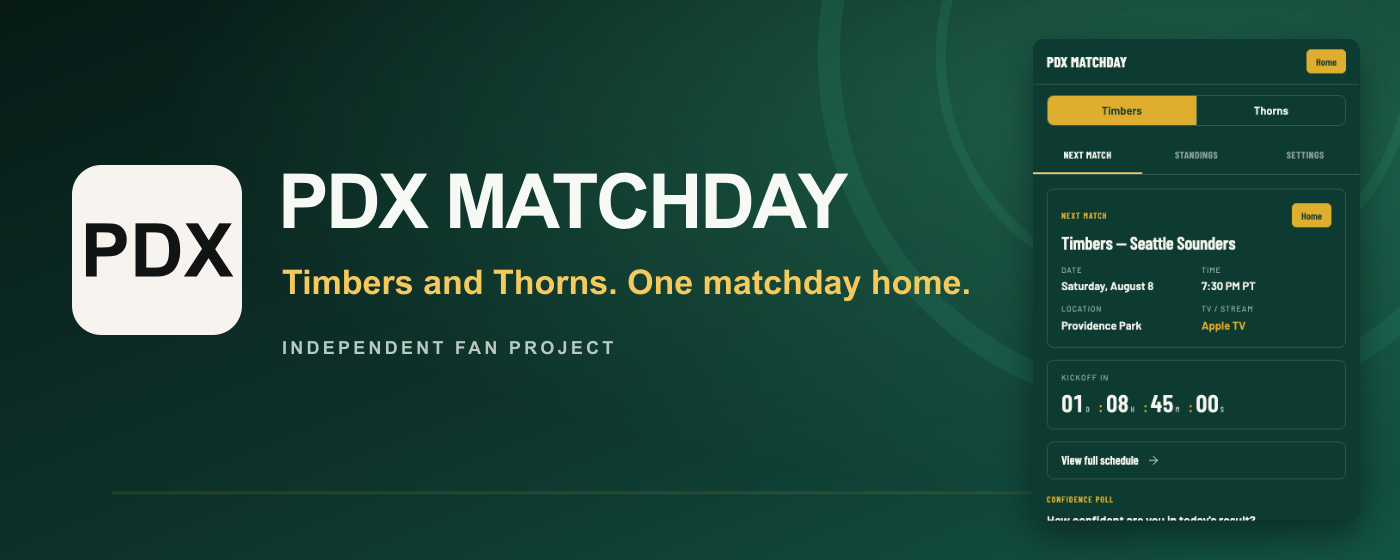
The extension is live and publicly listed on the Chrome Web Store — searchable in the store as well as installable via direct link. The original package was submitted and approved on March 6, 2026; release 1.0.5 was submitted and approved on 2026-09-25.
Store publication is intentionally outside the automated deployment workflow.
The original PDX Matchday identity, required promotional graphics, and five current-feature screenshots ship with this repository. Listing copy, permission justifications, privacy disclosures, release notes, and the final human review checklist are maintained privately and are not published in this repository. No current artwork uses a club crest, league mark, or official trade dress, and the listing explicitly identifies the extension as an independent fan project.
- Manifest V3 compliant
- Icons at 16px, 48px, and 128px
- Permissions (
storage,alarms,notifications, and specific hosts for Firebase anonymous authentication, token refresh, and the Matchday API; ESPN is accessed server-side only) - Privacy policy included (
PRIVACY.md) - No remote code execution; all logic is bundled locally
Privacy
See PRIVACY.md for the full privacy policy.
Summary: Match data and local poll state are stored in extension-local browser storage. Community polling uses a Firebase anonymous account and the authenticated Matchday API. The public package does not send passive product analytics or regional analytics.
Analytics
Passive product analytics and regional analytics are disabled in the compatibility release. Any future analytics implementation requires a separate opt-in, updated runtime behavior, updated store disclosures, and a matching privacy-policy release.
Contributing
- Fork the repository
- Create a feature branch (
git checkout -b feature/my-feature) - Commit your changes and push to your fork
- Open a pull request against
main
License
This project is licensed under the ISC License. See LICENSE.